Making an Atari 8-bit boot disk (and getting other Atari 8-bit software) from disk images
Introduction
If you have found this page directly from an Internet search (as opposed to a link from my disk imaging introduction page) you have most likely missed some important information. Please click to READ THIS INTRODUCTORY PAGE FIRST. It explains some generic aspects of disk imaging and why, even if you DO have a good bootable disk, it may not work.

Figure 1. The classic Atari 800XL
Hardware requirements
To make disks like I did you'll need the following hardware:
- A PC with either a USB 2.0 or a RS-232 serial interface
- An Atari 8-bit computer with a disk drive
- The Atarimax Universal SIO2PC interface plus cables
- Blank 5.25 inch double density disks in good condition
The SIO2PC interface sits between your PC and the peripheral port on your Atari drive.
If you have an old MS-DOS machine there is a REMOTE CHANCE of an alternate solution which requires no extra hardware (see below). It depends on what Atari configuration you have.

Figure 2. A marvel of modern technology. The USB SIO2PC interface
Software
All you need to do is go APE! This shareware product is sold with the SIO2PC interface. This not only allows you to make real disks from disk images, but a whole heap of other things as well. Documentation could be better for the Atari 8-bit newbie, but you'll soon get your head around it.
I reviewed this hardware/software combination in another article so rather than re-type it here, I'll just direct you to this more comprehensive impression.
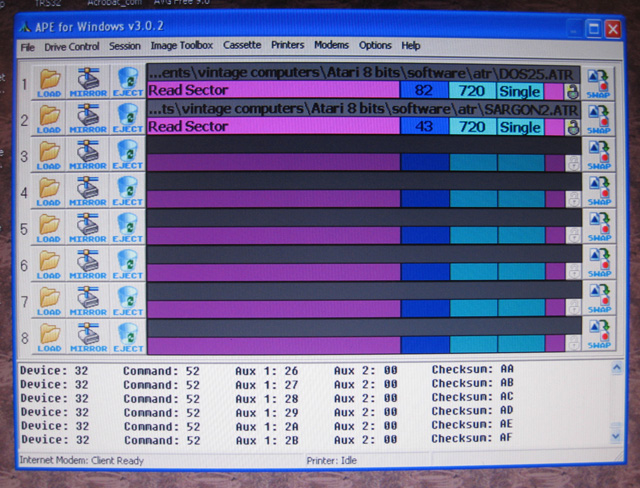
Figure 3. The busy and colourful world of APE
But I don't want to buy any extra hardware!
You might also like to check out the program WriteAtr as described on this page. MS-DOS only. Be warned though, it only supports enhanced or double density disk writing. Single density is the standard Atari 8-bit disk format. To produce disks readable in your Atari then, the latter will need the hardware add-on(s) to support enhanced or double-density capability.
I'm happy to ditch the disk drive altogether!
If that's the case, consider the SIO2SD disk drive emulator. Here's my take on it. With this wonderful device you can forget about floppy diks forever.
Last words
The SIO2PC and APE combination is an easy-to-use and comprehensive supported solution for Windows machines. When used with my trusty 1050 Atari disk drive I found the system described above stable and useable. Give it a go and you'll soon be playing Defender just like we did in the early 1980s!
Tez
Original article 29th December, 2011. Updated 28th July, 2015