Adventures in Digital Archaeology: Recovering SCAP-Dick Smith’s lost System 80 inventory software
Introduction
A passion of mine over the years has been to document the history around the Dick Smith System 80, a TRS-80 Model 1 clone computer popular in Australia and New Zealand from 1980 to 1983. Although much of what was sold for the machine was, in fact, TRS-80 Model 1 software, Dick Smith did commission programmers to write original packages to support the System 80. Over the years I’d managed to collect this software and make it available on my System 80 website.
That is all except one package…
That package was Stock Control and Pricing, usually abbreviated as SCAP.
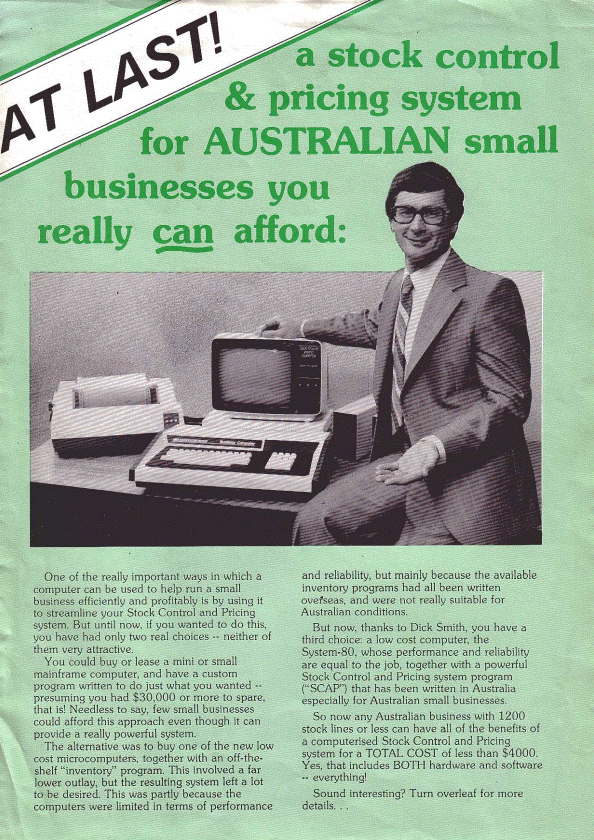
Figure 1. The front page of the SCAP brochure
Ok, one could argue that a stock and inventory program doesn’t usually get the adrenaline pumping. However, the manual and software for this package had alluded me and I really wanted to complete the Dick Smith Software Collection. I truly thought that SCAP was lost forever until on March 1st, 2026 when, while idly Googling for it (something I did every year or so…just in case!), I came across a post from Alan Laughton, administrator of the Microbee Technology Forum.
It seems about a year ago, Alan had been passed the SCAP manual from a member called kimjohn. The manual had two program listings at the end. This opened the possibility of a working version of the software being recovered from these listings!
Alan scanned the manual at 300 DPI capturing the contents in a PDF file. In the process he converted those program listings to raw text using OCR scanning. It wasn’t an easy process. The listings were in a tiny font and had very few spaces. After converting to text, Alan had laboriously gone through correcting any OCR errors he could see. This meant correcting “1”s which had been mistaken for “I”s, “0”s converted as “O”s, “5”s which had been changed to “S”s (and vice versa) and so on. He had also converted some of the <down arrow> line feeds in long single PRINT statements to separate PRINT statements for easier editing. However, even after all this work, he still couldn’t get the package to work.
Alan graciously passed both the manual PDF and the program listings as text files onto me, to archive on the System 80 website, and to see if I could get the package running.
And so the adventure began…
SCAP: An overview
As mentioned previously, SCAP was a Stock Control and Pricing package, used to record the comings and goings of inventory in a retail store. The manual is written in plain, relatable English, guiding the user by the hand through setting up and running the software in their own business.
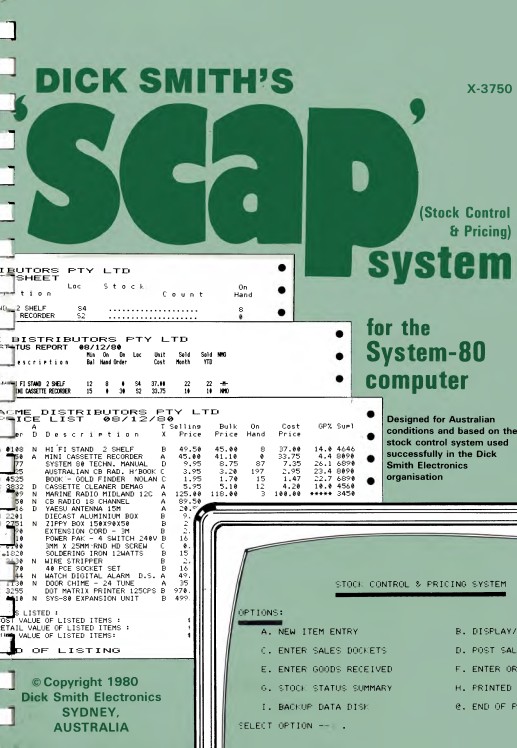
Figure 2 - The front page of the SCAP manual
The manual (and the code) assumes the user has a System 80. Although the software could work just as well on a TRS-80 Model 1, that machine is not mentioned. It is clear that Dick Smith saw SCAP as a useful, “serious” application which could help System 80 sales into the small business market. Figure 1 shows the ideal hardware; A System 80 (preferably the MKII business variant), a dedicated monitor, disk capable with two drives and a printer. The full deal!
SCAP came on a self-booting disk, which contained PERCOM’s MicroDOS (rebadged as OS-80 and sold separately by Dick Smith). MicroDOS is tiny, only 7k. It loads into memory on boot and extends Level II BASIC with a few disk handling commands and functionality. SCAP itself consisted of two programs written in BASIC, the larger of which loaded and ran automatically when the computer booted.
Users would carry out all tasks through a series of menus, although users were instructed to use the MicroDOS formatting command directly from BASIC when formatting data disks. All data entered was kept on the data disk in the second drive (Drive 1).
Although the System 80 could be expanded to 48K of RAM, memory was expensive in 1981 so the program, at least according to the manual, was written (or rather squeezed) to be run in 32K. This small memory space, and the fact it was written in BASIC (and mostly Level II BASIC at that!) put many constrains on the software mainly…
- REM statements are few and far between. These statements take up precious RAM space so the program is essentially undocumented
- The code is classic “spaghetti” code with many GOSUBS and GOTOS
- Given that BASIC is an interpreted language (as opposed to machine code), some processes, like data entry can be slow. Fast typists would have had to slow down for the software to keep up.
- Code for data entry is split between two programs. Data is loaded in one program, but the second one is called to organise and save data on the disk.
Figure 3 shows a small section of the code from the manual. As you can see, readability is not a feature.
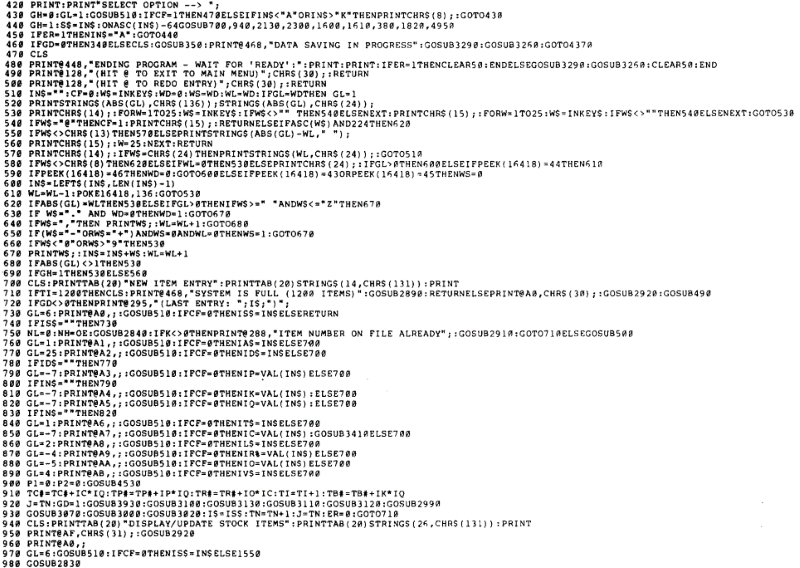
Figure 3. A sample of the SCAP code
Getting SCAP working
Step 1. Setting up the test platform
I used George Phillip’s excellent TRS80gp emulator for most of the testing and debugging. Just for authenticity, I had it operating in Model 1 mode but using the System 80 ROM.
The first problem was getting the code, onto a bootable floppy disk image. A bootable MicroDOS disk image was no problem to produce from the full MicroDOS package. MicroDOS doesn’t have a typical DOS directory structure though. BASIC Programs are saved by the user specifying a starting disk sector. The program is then written as a continuous file starting from that sector. MicroDOS tells the user the last sector used for the program. It is up to the user to note this and not overwrite those sectors with any other program being saved.
There were two BASIC programs that constituted the SCAP package, the main program called SCAP and a second one called SCPSST which was a routine which added to and rearranged data on the data disk after data entry. So, where were these SCAP programs supposed to reside on their program disk under MicroDOS? There was no mention of their sector start locations in the user manual. Thankfully the answer was in the code itself. In the main SCAP program there was a single call to LOAD 335, which I figured must load SCPSST from its staring sector at 335. In the latter, once all data disk writing was finished, there was a call back in turn to the main SCAP program with a LOAD 240 command. This indicates the SCAP program starts at sector 240.
Once I had a bootable MicroDOS disk image, using the emulator I entered in the main SCAP program and saved it sector 240. After a NEW, I then entered the second program and saved it starting at sector 335. Using MicroDOS, I then formatted a data disk in Drive 1. I was now ready to go.
Step 2. Correcting the code from OCR and transcription errors
Even though Alan had done a valiant job in picking up OCR errors, there were many more in the code. I went through the program line by line, comparing the manual’s code with Alan’s text files. It was laborious work. In the end I found 72 lines with OCR errors in the main SCAP program and one in SCPSST. There were even two lines labeled 4990, existing between a page break! The first of these, which loaded a non-existent program at sector 350 when a backup routine was called, simply didn’t make sense!?. I ignored this line.
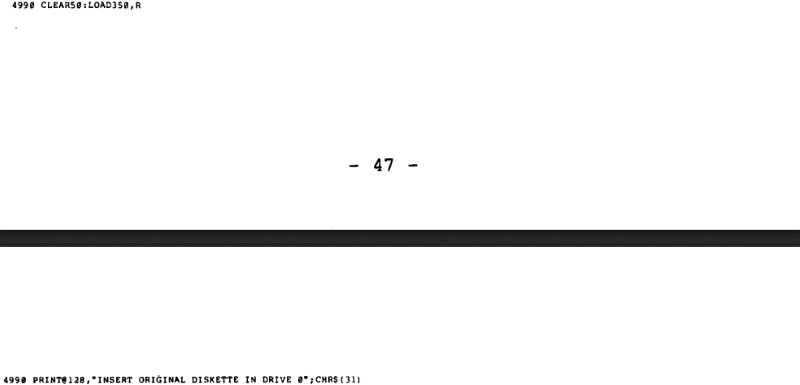
Figure 4. Two Line 4990s in the program listing??
Once I’d fixed these OCR errors, the program made it to the opening screen and beyond. Hooray!.
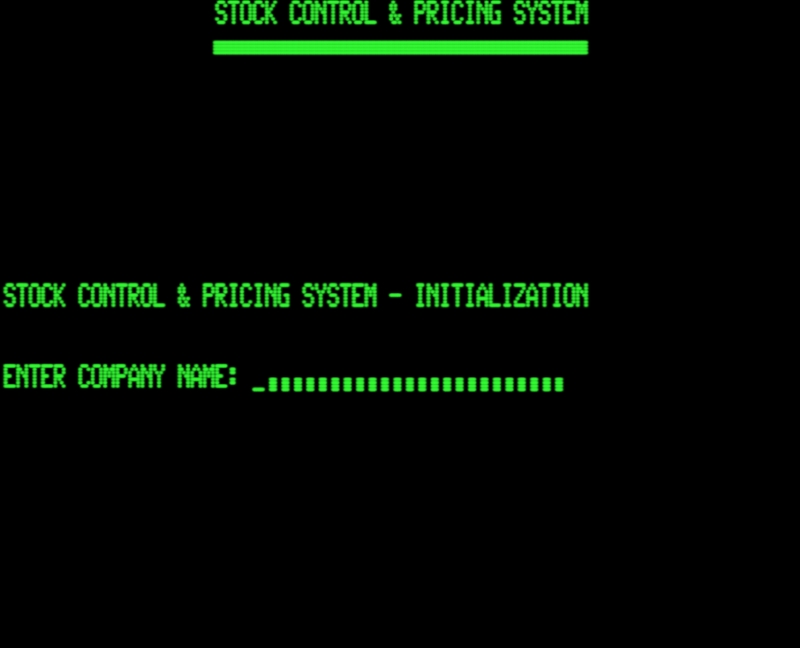
Figure 5 – SCAP Opening Screen
Step 3. Two thorny problems revealed during testing
However, as expected, other issues soon surfaced. There were two…
(i) An illegal function error on the first initial data entry
The first issue showed itself when data was entered for the very first time onto a blank disk. During this procedure the program crashed after typing in the identifier for the first data record (Figure 6).
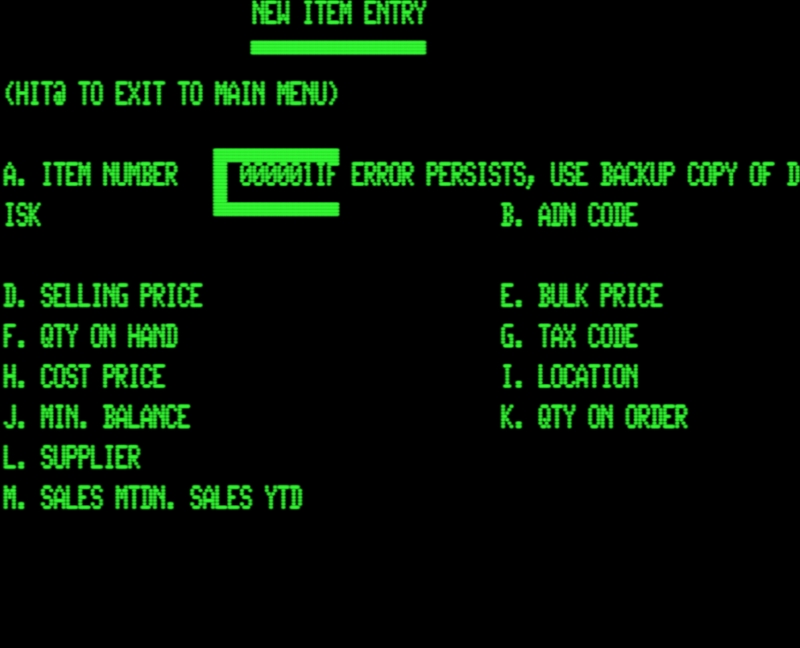
Figure 6. SCAP crashing with an error message on initial data entry
On throwing up the error the user is given the unhelpful but understandable message that an error has occurred and the program terminates. Checking the error code from BASIC once the program terminated pointed to an illegal function call.
Further experimentation showed that after being thrown back to the BASIC prompt, if the program was restarted (re-run), or a warm boot was initiated, or the data disk already had data, then things were fine. The error only happened after a cold boot, with a blank data disk??
Using TRON I tracked down the line where the error was occurring. It was the statement J=ABS(C(N)) in Line 2850. N it seemed was –1. Negative numbers are not allowed to index arrays in this version of BASIC.
I tried to work back to see where the value of N was coming from but, well, you know, many GOTOs and GOSUBS are hard to follow. Uncommented spaghetti code didn’t make it easy.
(ii) Error 2 – Out of memory after a reload of SCAP from SCPSST
The second problem occurred once a few records had been entered and SCPSST was called to sort and save the new data on the data disk. This seemed to work, but on reloading the main SCAP program, an out of memory error occurred. (Figure 7).
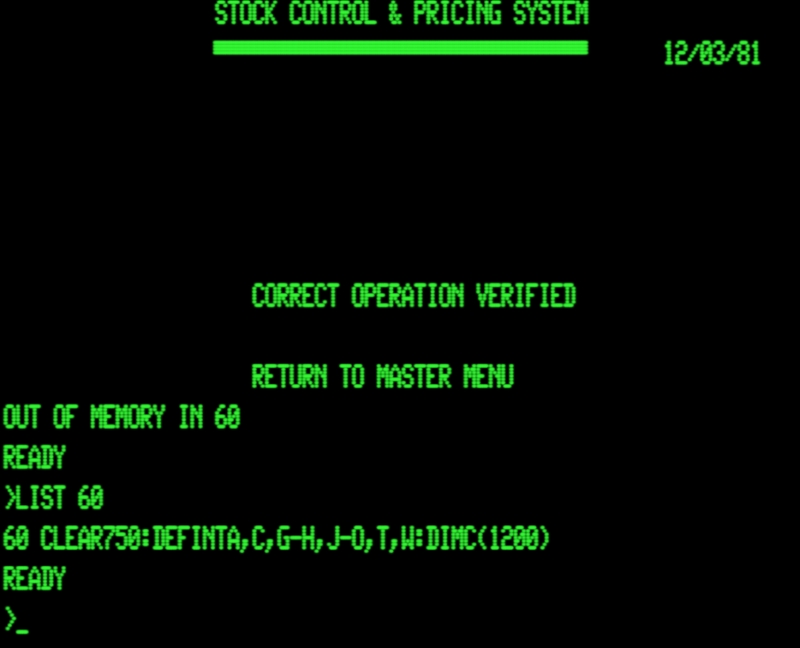
Figure 7. Out of memory error showing the line where the crash occurred
A.I. to the rescue
After trying to find where things were going wrong and failing, I had an idea. A.I. is suppose to be good at coding. Let’s see if those modern LLMs can help.
This was a last resort. Indeed, I was extremely skeptical that A.I. would be able to help me at all with these problems. After all, I was dealing with an archaic language (Level 2 BASIC) running under an extremely obscure DOS with code that jumped around to somewhere else at almost every second line.
I didn’t subscribe to any of the big three LLM services (Claude, Chat-GPT and Gemini) but, what the hell, I’ll just see what the free tiers could do. I outlined the problem and what I knew so far to the models, uploading the two pieces of code and the MicroDOS manual.
Claude mulled on the program then spat the dummy saying I’d used too many tokens, at least for the free service. Chat-GPT congratulated me on my assumptions and error finding so far, elaborated on what I’d already said and was essentially no help whatsoever.
 (Google's Chatbot) on the other hand, nailed it.
Here’s what Gemini said regarding the first error …
“Error 1: The "Illegal Function Call"
The culprit is a negative array subscript. In TRS-80 Level II BASIC, passing a negative index to an array (like C(-10)) throws an "Illegal function call" (Error 5).
The Mechanism:
- On a cold boot with a fresh disk, GOSUB 3170 executes a GET #1, PT to read the system sector. Because the disk is completely blank, the field buffer I5$ reads as null/garbage.
- Line 3180 converts this garbage using TN=CVI(I5$), which results in a random, often negative, number.
- Line 3190 sets OE = TN, so OE becomes this negative number.
- Because the disk is blank, the program triggers the initialization routine at Line 2110. Line 2110 correctly resets TN=1, TC#=0, etc. However, the programmer forgot to reset OE!
- When you enter your first item, Line 750 sets the binary search upper bound: NH=OE. Because OE is still negative, the search calculates a negative array index N.
- Line 2850 executes J=ABS(C(N)). Since N is negative, Level II BASIC immediately throws an Illegal Function Call.
- On a warm boot, the initialization has already saved TN=1 to the disk. The GET command reads it correctly, OE becomes 1, the search evaluates to 0, and Line 2850 is safely bypassed.
The Fix:
Simply add OE=1 to the initialization variables in Line 2110.
Change Line 2110 to:
2110 TC#=0:TP#=0:TB#=0:TM#=0:TY#=0:TR#=0:TI=0:TN=1:HI=0:HN=1:G=0:ER=1:OE=1”
I implemented this suggestion and it worked! The error disappeared and further testing showed everything was now working ok! Well done Gemini!
Here’s what Gemini said about the second error…
“Error 2: "Out of Memory" after the sort routine
This one is a classic memory management trap, and it stems from a hardcoded assumption in the Sort program (SCPSST).The Mechanism:
The Main program, combined with OS-80, the DIM C(1200) array, and string space, takes up nearly 34 KB of RAM. This means it requires a 48K system to run. On your initial boot, your machine (or emulator) provides the full 48K (which goes up to memory address &HFFFF / 65535).
However, look at the Sort program:
- Line 50 POKEs addresses 16561 and 16562. In Level II BASIC, this is the MEMTOP / string space pointer. It temporarily lowers this limit to &HBE40 (48704) to protect the machine language sorting routine from being overwritten by BASIC.
- Line 240 is supposed to release this protection before reloading the Main program. It does this by executing POKE 16561,255: POKE 16562,191.
The problem? 191 * 256 + 255 = 49151, which is &HBFFF. The programmer hardcoded the memory reset to the top of a 32K machine.
When the Sort program finishes, it artificially caps your 48K system at 32K. It then loads the massive Main program. When the Main program hits Line 60 and attempts to run CLEAR 750 and DIM C(1200), the array space violently collides with the string space inside that artificially cramped 32K limit, resulting in an "Out of Memory" (Error 7) crash.
The Fix:
Instead of hardcoding the memory limit to 32K, we can make the Sort program read whatever the memory limit actually is before it changes it, and then restore those exact values.
Add a new Line 45:
45 HM=PEEK(16561):HL=PEEK(16562)Change Line 240 to:
240 POKE 16561,HM:POKE 16562,HL”
Now in this one, Gemini nailed the cause but not the solution. Any values assigned to variables at 45 were nuked by the CLEAR statement resetting the variable table in line 60 after protecting memory size in line 50. After being made aware that its fix didn’t work Gemini suggested a work-around by saving the max memory variables in the cassette buffer before the CLEAR e.g …
“Change your Line 45 to:
45 POKE 16896, PEEK(16561) : POKE 16897, PEEK(16562)
Then afterwards retrieve them directly from the buffer to restore the memory:Change Line 240 to:
240 POKE 16561, PEEK(16896) : POKE 16562, PEEK(16897)This completely bypasses the variable table, making it immune to the CLEAR command on line 60.”
This worked but in the end, I didn’t implement Gemini’s suggestion. I decided to simply hardcode an assumed memory limit of 48k before calling the main SCAP program from SCPSST The following two sections explain why…
The production code vs. the manual code
The code in the manual is simply too large to run in 32k of RAM. Where memory was capped at 32k during testing the main SCAP program ALWAYS ran out of memory! This was even after I deleted any REM comments I added myself to the original program, and resorted back to using line feeds to save space in PRINT statements, as the original code had.
However, I COULD get SCAP to run in 32k of RAM if I stripped out ALL the REM statements (excluding the called one at Line 4310) in the manual code. This is an indication that the manual listing was not exactly the same as the production code, which could also explain how first error mentioned above found its way into the manual listing, and the existence of two lines of 4990 in the same. The code in the manual may have been transcribed and embellished with REMS rather than have been a true listing of the production code.
The reconstructed version vs. the manual code
Anyway, for the reconstructed version of SCAP on the disk image, I elected to use the more verbose version of the code found in the manual together with a few REM additions of my own, Gemini’s correction in Line 2110 and extra PRINT statements substituted for the <down arrow> when used in long single PRINT statements. These extra PRINT statements made the code much easier to maintain in text files. Consequently, the restored version of SCAP needs 48k of RAM to work. This is of no concern as 48K is the usual RAM for emulators assuming disk systems and probably any disk-enabled real System 80s in the wild.
Given this (and as alluded to above), I made Line 240 of SCPSST to read POKE16561,255:POKE16562,255 thereby resetting top of memory to 48K, rather than 32k as in the manual code, before SCPSST reloaded SCAP.
As a final tweak, I used the appropriate MicroDOS commands to alter the SCAP disk image, to load SCAP on boot, with a friendly message telling users that the program was loading and to please wait. I’m sure the original commercial disk ran the program automatically and displayed a similar message.
Final words
As mentioned in the introduction, I’d been looking for SCAP for years. It’s now uploaded to the Dick Smith Software Section of the System 80 archive site. At that link you can pick up the manual and a zip file with disk images of the restored SCAP program and a blank data disk. Although this is a restored 48K-only version from code in the manual rather than an image of the commercial disks, it seems to work as described. It's great to have it added it to the repository. What is missing still is the demonstration data disk, referred to in the manual’s tutorial. That may be lost forever, but you never know what might be found in someone’s dusty garage in the future.
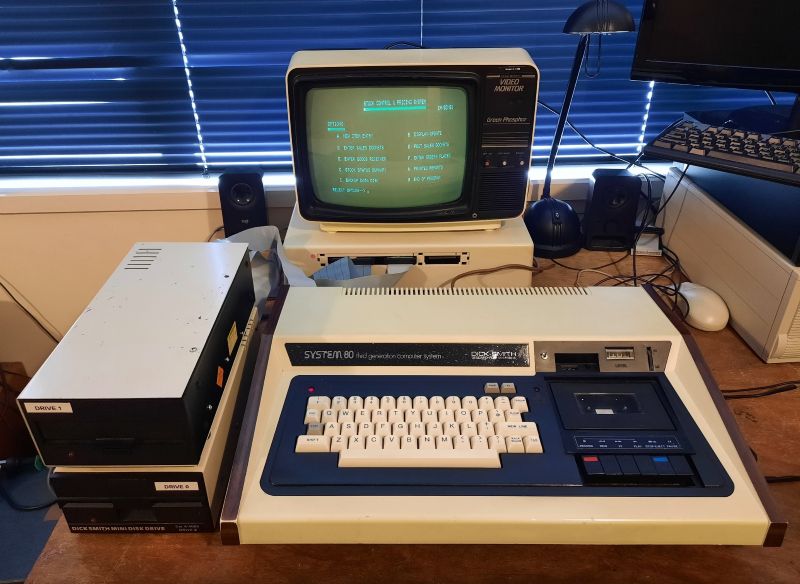
Figure 8. SCAP running on a real System 80 (i.e. my own!)
Debugging was fun. I learned about MicroDOS, was reminded just how convoluted (and indecipherable) some BASIC programs could be AND was very impressed that Google’s Gemini could work through this archaic convoluted code, diagnose and suggest work-arounds for both the errors.
Anyway, I hope you enjoyed this example of digital archaeology.
Terry Stewart (Tez)
14th March, 2026